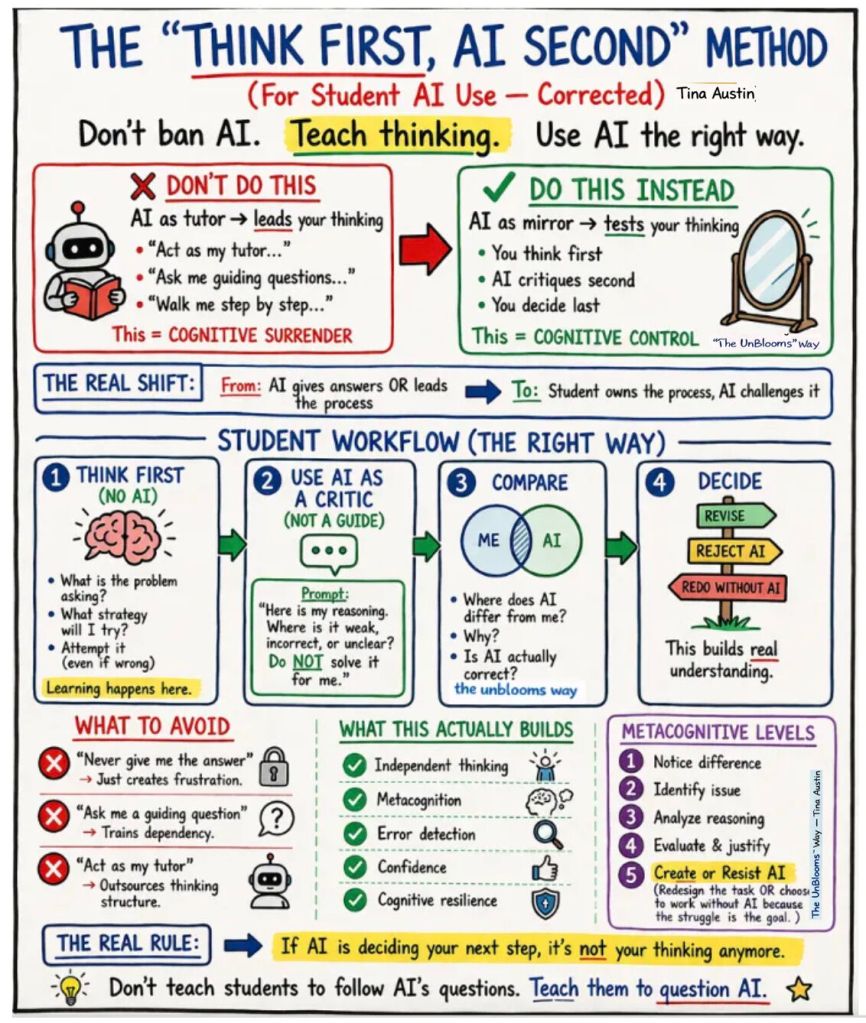
HOW TO….
….COME UP WITH A GOOD PROMPT:
- Be specific: Include details about features, style, and what you’re trying to accomplish.
- Add structure: Break your prompt into clear parts like what you’re building, what you want done, and any rules or limits.
- Give examples: Reference apps, screenshots, or styles you like sothat your AI knows what to aim for.
- Work in steps: Build the core functionality of your app and then add or adjust individual features one by one.
- Refine and repeat: Review what your specific AI tool/platform creates, give feedback, and tweak your prompt to improve results.
📍Also check out Vercel v0’s tips for prompting and design execution here, and Google’s Gemini Omni prompting guide.
…THINK FOR YOURSELF & BE MORE CREATIVE THAN AI:
To start with, check out Shae O’s Critical Thinking Bot that challenges you rather than thinks for you >> click here to interact <<
- Useful insights and tips by @AlexPrompter on X, prompted by the publication of the largest study (to date) on AI creativity:
→ Stop accepting first-draft AI output as creative or diverse. If you need 10 ideas, generate 30 and throw away the obvious ones
→ Use temperature and sampling parameters aggressively to push models out of their comfort zone
→ Cross-reference multiple models AND multiple prompting strategies, because same model with different prompts often beats different models with the same prompt
→ Add constraints that force novelty like “give me ideas that a traditional investor would hate” instead of “give me creative ideas”
→ Use structured prompting techniques like Verbalized Sampling to force the model to explore low-probability outputs instead of defaulting to consensus
→ Layer your own taste and judgment on top of everything AI gives you. The model gets you raw material. Your weirdness and experience make it original.
…RUN AI LOCALLY ON YOUR OWN DEVICE:
With all the environmental concerns related to AI, not to mention privacy and other concerns, there are growing resources on how to spend less energy when/if using AI (some eco-conscious approaches to AI are also included in the Resources section).
To start with, check out Shae O.’s tutorial on using local AI on your own device for free:
…and also, Shae’s “How to use AI Without Using Data Centers: A Beginner’s Guide to Local and Offline AI” (see more videos on her channel, Critical Thinking in the Age of AI).
… LEARN CREATIVE CODING:
Easy-to-follow tutorial by @pikacodes:
… GET MORE TECHNICAL:
We’re sure some of you are looking for technical tutorials as well, and although this is not the place for highly technical advice, we want to include some easy-to-follow tutorials such as the ones below. Let us know what other tutorials you’d like to see.
Header image credits: Deborah Lupton / https://betterimagesofai.org / https://creativecommons.org/licenses/by/4.0/ Visual description: A collage made of 13 different images arranged in a rectangular formation in the style of pop art. The images include vintage photographs of old signs, part of a vintage poster, a vintage space image, historic black and white photos of a male labourer carrying a sack and of a human eye, comic book-style words ‘Wow!’, ‘Bam!’ and ‘Boom!’ as well as a comic book-style woman’s face and images of digital tech, including a computer, a smart phone and computer chips.
 Expressive AI
Leave a comment